How to Send a File on WhatsApp for Printing Without Layout Problems
A student walked up to our counter in Harbanspura last admission season, holding a phone, upset that the file he had printed had a heading sitting halfway off the page. He had done nothing wrong on his end. The document was fine on his laptop. What went wrong happened in the two seconds between him tapping send on WhatsApp and us opening it.
That gap is where most printing complaints start. Not the printer. Not the paper. The way the file travelled. Here is what actually happens to your file on WhatsApp, and the small habits that stop your layout from moving.
Send it as a “Document”, never as a photo
WhatsApp treats a picture and a file as two completely different things.
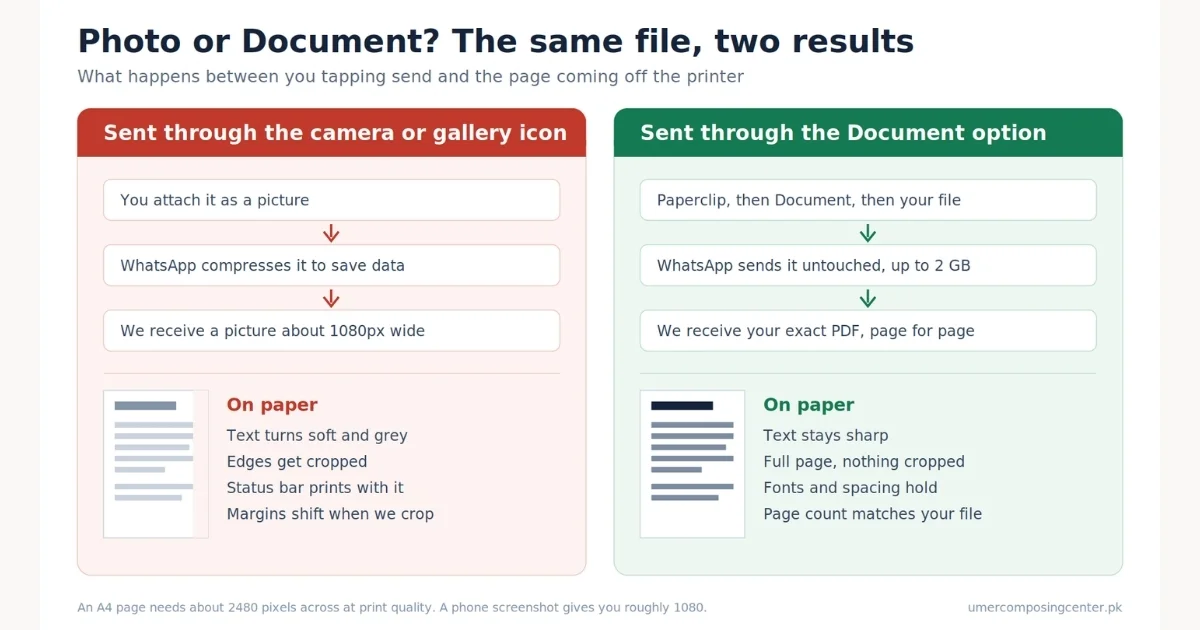
When you attach something through the image or camera icon, WhatsApp compresses it. It shrinks the resolution to save data. Text that looked sharp on your screen turns soft and grey once it hits A4 paper. Edges get cropped. A signature at the bottom of a page can vanish.
When you attach through the Document option, WhatsApp sends it exactly as it is. Nothing is squeezed. Nothing is cropped. The file that reaches our machine is byte for byte the same file sitting on your phone.
Where the Document option sits
On Android and iPhone, open the chat, tap the paperclip or + icon, then pick Document. Browse to your file and send. On WhatsApp Web, click the paperclip at the top of the chat and choose Document rather than Photos & Videos.
One check before you send: after it uploads, the message should show a file icon with a name like assignment.pdf and a page count. If you see a small square picture preview instead, you sent an image. Delete it and send it again through Document.
What a screenshot costs you on paper
Screenshots are the single most common reason a print job looks wrong. A screenshot captures your phone screen, not your document. Your phone screen is roughly 1080 pixels wide. An A4 page at proper print quality needs around 2480 pixels across. We are stretching a small picture to more than double its size, and the paper shows every bit of that.
Screenshots of a PDF also carry your status bar, battery icon, and the app’s toolbar into the print. We can crop those out, but cropping shifts the margins, and shifted margins are exactly what gets an assignment sent back.
Why PDF beats Word for printing
Send a PDF whenever you can. A PDF locks your layout in place. Fonts, spacing, page breaks, table widths, image positions, all of it is baked in.
A Word file does not carry your fonts with it. It carries the name of the font. If your document uses Jameel Noori Nastaleeq for an Urdu heading, or a downloaded font for a title page, and that font is not installed on the machine opening it, Word quietly swaps in something else. The replacement font is a different width. Lines rewrap. A three-page document becomes four. Your neat title page slides down.
This bites hardest on:
- Urdu and Arabic text, where font substitution can break the script shaping entirely
- Title pages built with spacing and tabs
- Tables that fit one page by a whisker
- Documents with page numbers, headers or footers
- CVs, where one shifted line pushes your last job onto page two
Saving as PDF takes about ten seconds
On a laptop, in Word: File, then Save As, then pick PDF from the file type list. In Google Docs: File, Download, PDF Document.
On a phone: Open the file in Microsoft Word or Google Docs, tap the three dots, then Share and Export or Print, and choose Save as PDF. Google Docs on Android has a direct “Send a copy” option with a PDF checkbox.
Then open the PDF you just made and scroll through it before you send. Whatever you see there is what our printer will produce.
If you only have a Word file and no way to convert it, send it anyway and tell us. We will open it, check the layout against what you describe, and message you a PDF proof before anything goes on paper.
The six details to write in your file
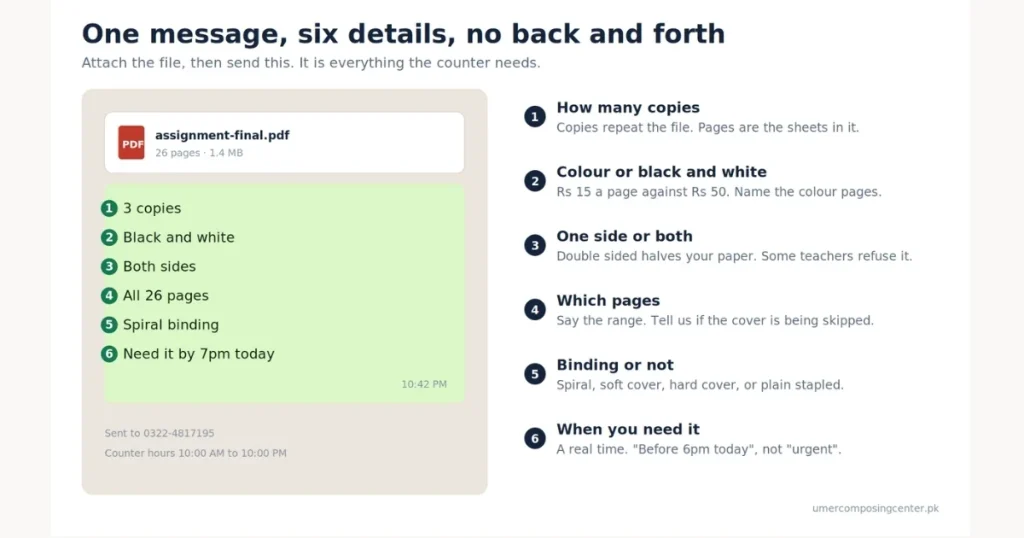
Attach the file, then type one message with these six things. It removes every round of back and forth.
- How many copies? “3 copies”, not “kuch copies”.
- Colour or black and white. If only some pages need colour, name those page numbers.
- One side or both sides. Double-sided halves your paper cost. Some teachers and offices refuse it.
- Which pages. “All 24 pages” or “pages 1 to 12 only”. If you are skipping the cover, say so.
- Binding or not. Spiral, soft cover, hard cover, or plain stapled.
- When you need it. A real time, like “before 6pm today”, not “urgent”.
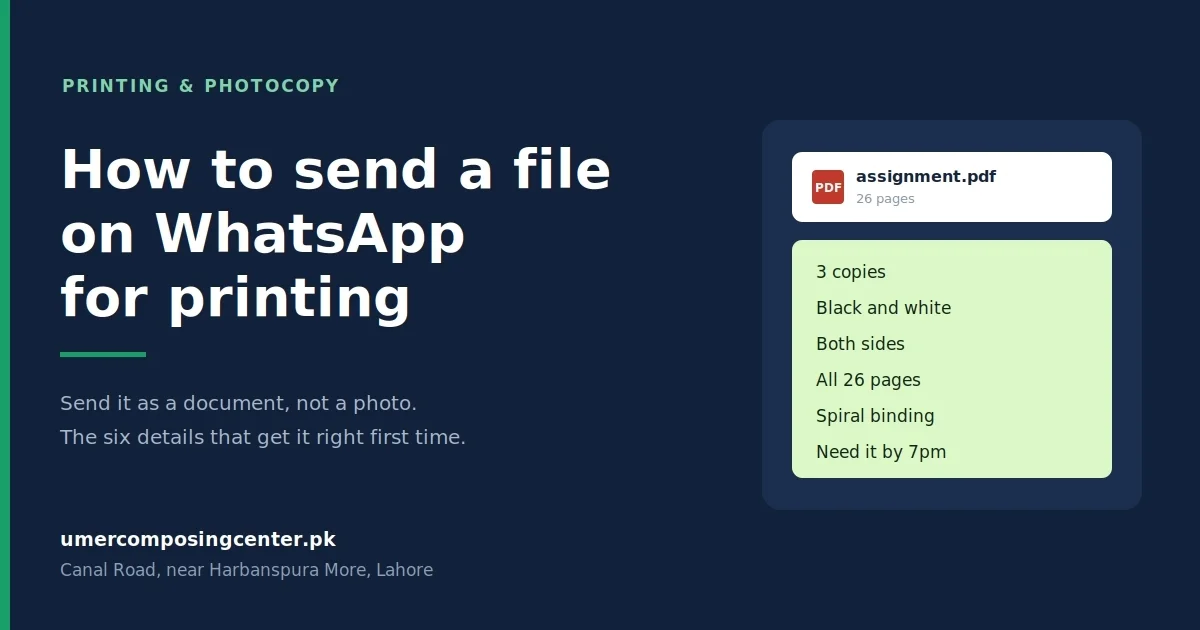
A message that reads “3 copies, black and white, both sides, all 26 pages, spiral binding, need it by 7pm” gets printed correctly the first time, every time.
If you want the total before you commit, our printing rates page and the price calculator on the site will work it out for you at home.
Page ranges, copies, and colour, said clearly
Two words cause more reprints than anything else: “print it”.
Say copies when you want the same page repeated, and pages when you mean the sheets in the file. “10 pages” and “10 copies” of a 10-page file are 10 sheets and 100 sheets. That is a difference of Rs 15 against Rs 150 on black and white A4.
For mixed jobs, write it as a short list:
Pages 1 to 3 in colour, Pages 4 to 40 in black and white, 2 copies of the whole thing, double-sided from page 4 onward
Anyone at the counter can follow that. So can we at 9pm on a Sunday?
What do we check before the printer starts
Every file that arrives on 0322-4817195 goes through the same short check:
- Does the page count in the file match the number you wrote?
- Are any pages sideways when the rest are upright?
- Is anything sitting closer than about half an inch from the edge, where the printer cannot reach?
- Are the images sharp enough to hold up at full page size?
- Did any font fail to load if it is a Word file?
If something looks off, you get a message before we print, not a phone call after. On a big job we will send a photo of the first printed page so you can approve it.
What if the file is too large to send?
WhatsApp accepts documents up to 2 GB, so an assignment or a thesis will never hit the ceiling. Scanned files are a different story, because a badly scanned 60-page book can run to hundreds of megabytes and crawl on a weak signal.
Three ways around it:
- Send the file in parts and number the messages, “part 1 of 3”
- Upload to Google Drive and send us the link with sharing set to “anyone with the link”
- Email it to info@umercomposingcenter.pk
If a portal or a form is rejecting your file for being too large, that is a compression problem rather than a sending problem, and our guide on fixing upload errors for online forms covers how to shrink it without wrecking the quality.
Collection or delivery
Once it is printed, you can collect it from the shop in front of Government Boys High School, Harbanspura, open from 10:00 AM to 10:00 PM every day. We are a short ride from Harbanspura Interchange, Taj Bagh, Mughalpura, and the University of Gujrat Lahore campus on Main Canal Bank.
For bigger jobs, or if you are stuck in a class or a shift, send a rider through any bike service. Message us when the rider is on the way, and the job will be bagged and waiting so he is not standing around on your meter.
Send your file to 0322-4817195 on WhatsApp with those six details, and it will be printed the way you wrote it.
Frequently asked questions
Can I send a photo of my document instead of the file?
You can, but the print quality drops sharply. WhatsApp compresses photos, so text gets soft and edges get cut. Send the PDF or Word file through the Document option in the paperclip menu instead.
Should I send a PDF or a Word file for printing? PDF. It locks your fonts, spacing and page breaks in place. A Word file can rewrap on a different machine if the fonts are missing, which moves your headings and changes the page count.
How do I send a file as a document on WhatsApp?
Open the chat, tap the paperclip or plus icon, choose Document, then pick your file. After sending, the message should show a file name and page count, not a picture preview.
What is the largest file WhatsApp will send?
Documents can be up to 2 GB. If a scan is slow to upload on your connection, split it into parts or send a Google Drive link.
Do you print files sent late at night?
The counter runs from 10:00 AM to 10:00 PM. Files that arrive after closing are picked up first thing the next morning, which is why students send assignments the night before a submission.
How much does black-and-white printing cost?
Rs 15 per A4 page for black and white and Rs 50 per page for colour. Photocopying is cheaper at Rs 10 per page, dropping to Rs 9 per page on runs of 50 or more.
Can I get the file bound the same day?
Yes. Binding runs Rs 60 to Rs 100 per book depending on whether you want spiral, soft cover, or hard cover. Send the file with enough time before closing, and it will be ready the same evening.